When you’re running a small business you wear many hats; one minute you’re dealing with customer service, the next with invoices, posting on social media, managing stock and following up on sales leads. Initially this personal approach might be manageable but eventually it will become too much as your business grows.
This is when the small business automation tools become crucial; they streamline mundane tasks, eliminate human error, increase efficiency and free up the owner to deal with strategic objectives instead of day to day running of the business.
It does not matter whether you’re running an online store, a service business, a consultancy, a start-up, a brick and mortar retailer – an automation solution can assist you with achieving more with less.
We’ll go on to look at business automation; what it is, why it is important, what automation tools you can implement and how small businesses can use them successfully.
What Are Automation Tools for Small Business?

When you’re running a small business you wear many hats; one minute you’re dealing with customer service, the next with invoices, posting on social media, managing stock and following up on sales leads. Initially this personal approach might be manageable but eventually it will become too much as your business grows.
This is when the small business automation tools become crucial; they streamline mundane tasks, eliminate human error, increase efficiency and free up the owner to deal with strategic objectives instead of day to day running of the business.
It does not matter whether you’re running an online store, a service business, a consultancy, a start-up, a brick and mortar retailer – an automation solution can assist you with achieving more with less.
We’ll go on to look at business automation; what it is, why it is important, what automation tools you can implement and how small businesses can use them successfully
Why Small Businesses Need Automation
It is a common assumption amongst most small business owners that automation technology is reserved for only larger enterprises. That is clearly not the case. In many cases small businesses stand to benefit more from automation than larger ones as they usually operate with the least staff and resources.
Common Challenges Faced by Small Businesses
| Challenge | Impact |
| Limited workforce | Employees handle multiple roles |
| Time-consuming manual tasks | Reduced productivity |
| Human errors | Financial and operational losses |
| Slow customer response | Lower customer satisfaction |
| Inconsistent follow-ups | Lost sales opportunities |
| Data management issues | Poor decision-making |
Automation provides solutions for these problems; by removing repetitive tasks and ensuring uniformity.
Advantages of Business Automation
Automation tools can significantly impact day-to-day processes.
1. Saves Valuable Time
Jobs that took hours now take minutes because they’re done automatically.
Examples include:
- Sending invoices
- Scheduling appointments
- Email follow-ups
- Social media posting
- Customer notifications
2. Reduces Human Errors
Manual data entry often results in mistakes.
Automation ensures:
- Accurate records
- Consistent communication
- Reliable reporting
- Better compliance
3. Improves Customer Experience
Customers expect quick responses and seamless service.
Automation helps by:
- Sending instant replies
- Providing appointment reminders
- Delivering order updates
- Managing customer support tickets
4. Grow revenue.
By helping businesses nurture leads into customers, the automated sales funnels and marketing campaigns result in more sales.
5. Supports growth.
Automation is a mechanism for a business to scale without requiring an immediate staff increase.
Types of Automation Tools for Small Businesses
Different business functions require different automation solutions.
| Business Area | Automation Purpose |
| Marketing | Email campaigns, lead nurturing |
| Sales | CRM management, follow-ups |
| Finance | Invoicing, payment reminders |
| HR | Employee onboarding |
| Customer Service | Chatbots, ticketing |
| Inventory | Stock tracking |
| Social Media | Content scheduling |
| Project Management | Task automation |
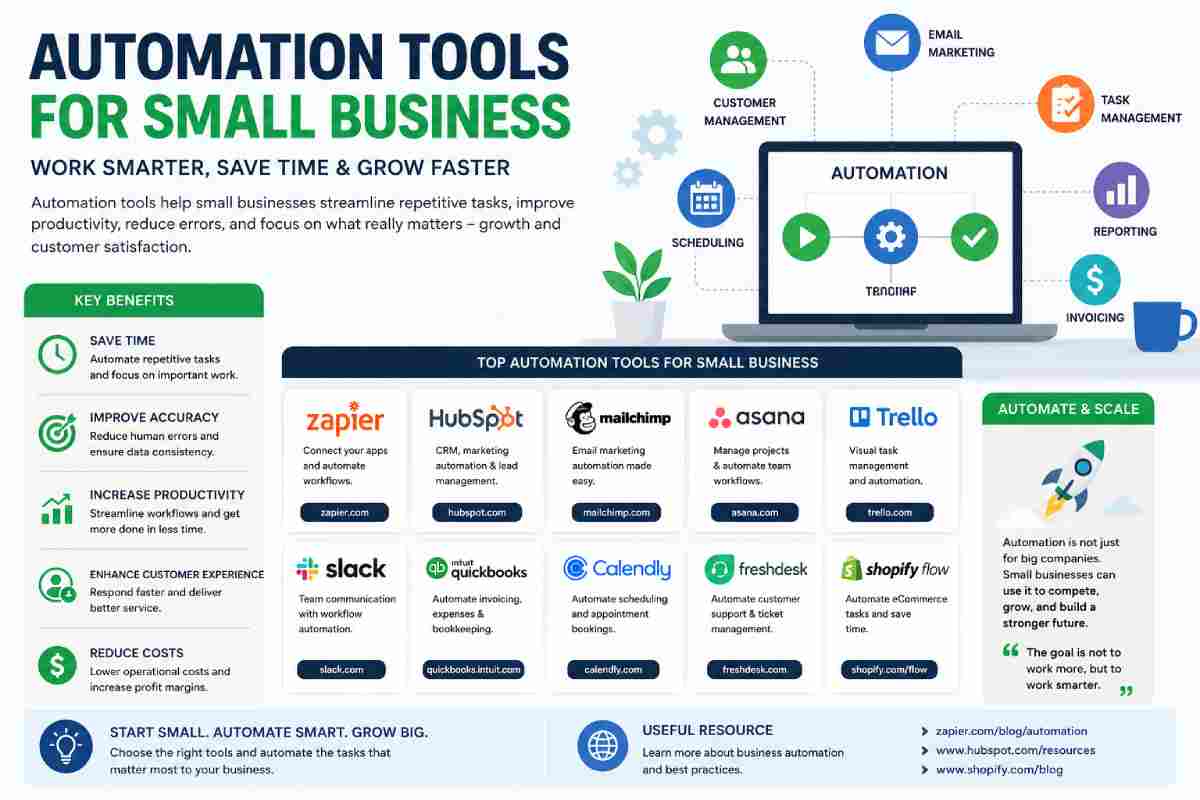
Top Automation Tools for Small Businesses
Below is some of the popular automation tools that successful small businesses around the world employ:
Comparison Table of Popular Automation Tools
| Tool | Best For | Starting Cost | Key Features |
| Zapier | Workflow Automation | Affordable | Connects apps automatically |
| HubSpot | Marketing & CRM | Free Plan Available | Lead management |
| Mailchimp | Email Marketing | Free/Paid | Automated campaigns |
| Trello | Project Management | Free Plan Available | Task workflows |
| Asana | Team Collaboration | Free/Paid | Process automation |
| QuickBooks | Accounting | Paid | Automated bookkeeping |
| Calendly | Scheduling | Free/Paid | Appointment booking |
| Slack | Team Communication | Free/Paid | Workflow integration |
| Shopify Flow | E-commerce Automation | Included with plans | Store automation |
| Freshdesk | Customer Support | Free/Paid | Ticket automation |
1. Zapier
What is Zapier?
Zapier is one of the best known automation tool currently available on the market. Zapier links together thousands of apps. It automates workflows
Example
When someone fills out a website contact form:
- Lead enters CRM automatically
- Welcome email is sent
- Sales team receives notification
- Task is created
No manual action required.
Best Features
- No coding required
- Thousands of integrations
- Workflow automation
- Lead management
- Time-saving processes
2. HubSpot
Complete CRM and Marketing Automation
HubSpot combines customer relationship management with powerful automation capabilities.
Features
- Lead tracking
- Automated emails
- Sales pipeline management
- Customer segmentation
- Analytics dashboard
Ideal For
- Startups
- Service businesses
- Marketing agencies
- Consultants
3. Mailchimp
Email Marketing Automation
Email has proven to be one of the highest ROI marketing channels.
Email marketing to your customers can be automated through Mailchimp.
Automated Campaign Examples
- Welcome emails
- Cart abandonment reminders
- Product recommendations
- Birthday promotions
- Newsletter sequences
Benefits
- Better engagement
- Increased conversions
- Consistent communication
4. QuickBooks
Accounting Automation
Financial management consumes a significant amount of time for small business owners.
QuickBooks automates many accounting functions.
Features
| Accounting Task | Automated Function |
| Invoices | Auto-generation |
| Payments | Tracking |
| Expenses | Categorization |
| Reports | Financial summaries |
| Taxes | Preparation support |
Benefits
- Faster bookkeeping
- Better financial visibility
- Reduced accounting errors
5. Calendly
Scheduling appointment
Emails back and forth for scheduling the meeting waste our time.
With Calendly, customer automatically schedule themselves with an available appointment slot.
Use Cases
- Sales calls
- Client consultations
- Interviews
- Coaching sessions
- Medical appointments
Advantages
- Eliminates scheduling conflicts
- Sends reminders automatically
- Integrates with calendars
6. Trello
Workflow and Task Automation
Trello makes team collaboration visual with its boards.
Its automation tool automates tasks and triggers actions.
Example Workflow
| Trigger | Action |
| Task completed | Move to next stage |
| Deadline approaching | Send reminder |
| New project created | Assign team member |
7. Asana
Business Process Automation
Asana supports organizations in handling their projects and the automation of repetitive work processes.
Automation Examples
- Assign tasks automatically
- Update project status
- Send notifications
- Generate recurring tasks
Ideal For
- Marketing teams
- Agencies
- Remote teams
- Growing startups
8. Slack
Communication Automation
Slack isn’t just messaging software.
It automates business communications by using integrations and workflows.
Examples
- Automated alerts
- Approval requests
- Project updates
- Customer notifications
Benefits
- Faster communication
- Improved collaboration
- Reduced email overload
9. Shopify Flow
E-commerce Automation
A typical online store might handle hundreds to thousands of transactions.
Shopify Flow automates standard store functions.
Common Automations
- Inventory updates
- Fraud detection
- Customer segmentation
- Order tagging
- Loyalty rewards
Results
- Faster operations
- Better customer experiences
- Reduced administrative workload
10. Freshdesk
Customer Support Automation
It is easy to become overloaded with customer service demands when your business takes off. Freshdesk allows you to automate various parts of your support.
Features
- Ticket routing
- Auto responses
- Chatbots
- SLA management
- Knowledge base automation
Benefits
- Faster support
- Improved customer satisfaction
- Reduced response times
How Automation Improves Different Departments
Marketing Automation
Marketing teams can automate:
- Email campaigns
- Social media posts
- Lead generation
- Customer segmentation
- Reporting
Result
More leads and higher conversion rates.
Sales Automation
Sales teams automate:
- Lead scoring
- Follow-up emails
- Meeting scheduling
- Proposal generation
- CRM updates
Result
More sales with less manual effort.
Customer Service Automation
Support teams automate:
- Frequently asked questions
- Ticket assignment
- Customer surveys
- Status updates
Result
Faster customer resolutions.
Finance Automation
Financial departments automate:
- Invoice creation
- Expense tracking
- Payment reminders
- Reporting
Result
Improved financial accuracy.
Signs Your Small Business Needs Automation
If you experience any of these situations regularly, automation may be necessary.
Warning Signs
- Employees repeat the same tasks daily
- Customer inquiries are increasing
- Leads are being missed
- Reporting takes too long
- Administrative work consumes too much time
- Business growth is slowing due to workload
How to Choose the Right Automation Tool
Not every business is suited to every tool. These are things to think about before committing.
Evaluation Checklist
| Factor | Questions to Ask |
| Ease of Use | Can non-technical staff use it? |
| Cost | Does it fit the budget? |
| Integrations | Works with existing software? |
| Scalability | Can it grow with the business? |
| Support | Is customer support available? |
| Security | Does it protect business data? |
Automation Mistakes to Avoid
Many companies don’t take full advantage of automation simply because it is not being used effectively.
Common Mistakes
Automating Bad Processes
Automation is a means of improving things; it doesn’t fix things which don’t work.
Choosing Too Many Tools
Too many conflicting and interwoven platforms.
Ignoring Employee Training
Employees need proper training to use automation effectively.
Lack of Monitoring
Workflows should be reviewed regularly to ensure optimal performance.
Future Trends in Small Business Automation
The world is changing rapidly due to technological advancement. These are just a few of the most significant trends that we can observe now:
AI
AI enabled systems:
- Generate content
- Analyze customer behavior
- Predict sales
- Improve customer support
Conversational Chatbots
Companies are more and more relying on intelligent chatbots to respond to customers.
Predictive Analytics
Automation platforms now forecast:
- Demand
- Revenue trends
- Customer behavior
Hyperautomation
Companies are integrating automated processes into each other to form a single flow.
Best Automation Tool by Business Type
| Business Type | Recommended Tool |
| E-commerce Store | Shopify Flow |
| Freelancer | Calendly |
| Marketing Agency | HubSpot |
| Startup | Zapier |
| Retail Business | QuickBooks |
| Service Company | Freshdesk |
| Remote Team | Slack |
| Project-Based Business | Asana |
| Small Team | Trello |
| Email Marketing Business | Mailchimp |
Final Thoughts
Automation was once thought of to be the luxury of big business; however small companies can now take advantage of an array of easy to use, cost-effective automation solutions that will enable them to run more efficiently and effectively than ever before.
Regardless of whether you are automating customer communications, sales follow up, accounting, scheduling, or marketing initiatives there is a solution that will save you hours of your precious time and enable you to work on more important projects as a team.
Also Read: https://www.easytechtrends.com